UPS
- 4.5
- Rating
- 10.00M
- Installs
- Free
- Price
 Analysis by App-foxy
Shipping problems rarely begin with the parcel itself. They begin with small uncertainties: whether a package has actually moved, where to take a return, how much a delivery might cost, or whether a nearby UPS location is open and suitable for the task. I found the UPS app useful because it gathers those practical questions in one place instead of making me switch between a tracking page, a map, and a calculator. It is a free business app from UPS, and its strongest quality is not excitement but the amount of repeated searching it can remove from an ordinary week.
I approached it as a tool rather than a company showcase. That matters because the app is most valuable when something needs checking quickly. If I am waiting for an important delivery, preparing a shipment, or looking for a place to drop off a package, I want a direct answer and a clear next step. UPS generally keeps that purpose in view. It is available to everyone in its age classification, and the large user base—over ten million installs, with a 4.5 average from roughly 220 thousand ratings—suggests that it has become a familiar companion for people who ship and receive regularly.
How UPS fits into real shipping routines
I find the most useful way to judge a shipping app is to look at the decisions it helps me make, not just the shipment status it displays. In this section, I’ll focus on how UPS can fit into a routine of checking, planning, and handing off parcels, while keeping in mind that each step still calls for a little attention from the person using it.
You May Also Like

 Blood Strike: 2.5 Anniversary
Blood Strike’s Loadouts Turn Every Drop Into a Tactical Gamble
A close look at Blood Strike’s custom loadouts: how fast access to signature weapons reshapes its battle royale rhythm, rewards preparation, and narrows the gap between fights.

 Pandora - Music & Podcasts
Pandora’s Music Is Easy to Start, but Harder to Recover
Pandora’s strength is its low-effort path from a seed to a station. Its weak spot is how much confidence it asks you to place in connection, setup, and quiet recovery.

 8 Ball Pool
 Is Built on Rivalries, Rematches, and Routine
A close look at the rivalries, rematches, shared routines, and unanswered safety questions that turn a quick pool match into a persistent mobile community.

 Samsung Music
’s Quiet Strength Is Playing What You Already Own
Its reach comes less from spectacle than from dependable access to a personal library. That simplicity is both the app’s strongest retention engine and its ceiling.

 AccuWeather: Weather Radar
AccuWeather Review: A Quick, Clear Forecast for Everyday Decisions
For everyday plans, the best forecast is the one you can understand quickly. AccuWeather makes rain timing, radar, and local conditions easy to act on, with a few trade-offs.

 Hill Climb Racing
Why Hill Climb Racing Still Turns Crashes Into One More Run
A tiny car, a bumpy hill and one more upgrade: Hill Climb Racing keeps resurfacing because its simple chaos makes every near-miss feel personal.
More From Our News Desk



The recurring problem is uncertainty, not postage
The usual alternative is to search for each task separately. I might use a notification from a retailer for one delivery, a browser search for a UPS location, and a different page to estimate the cost of sending something. That approach works, but it creates scattered information. It also makes it easy to lose the tracking number, open an outdated result, or arrive at a location that does not handle the service I need.
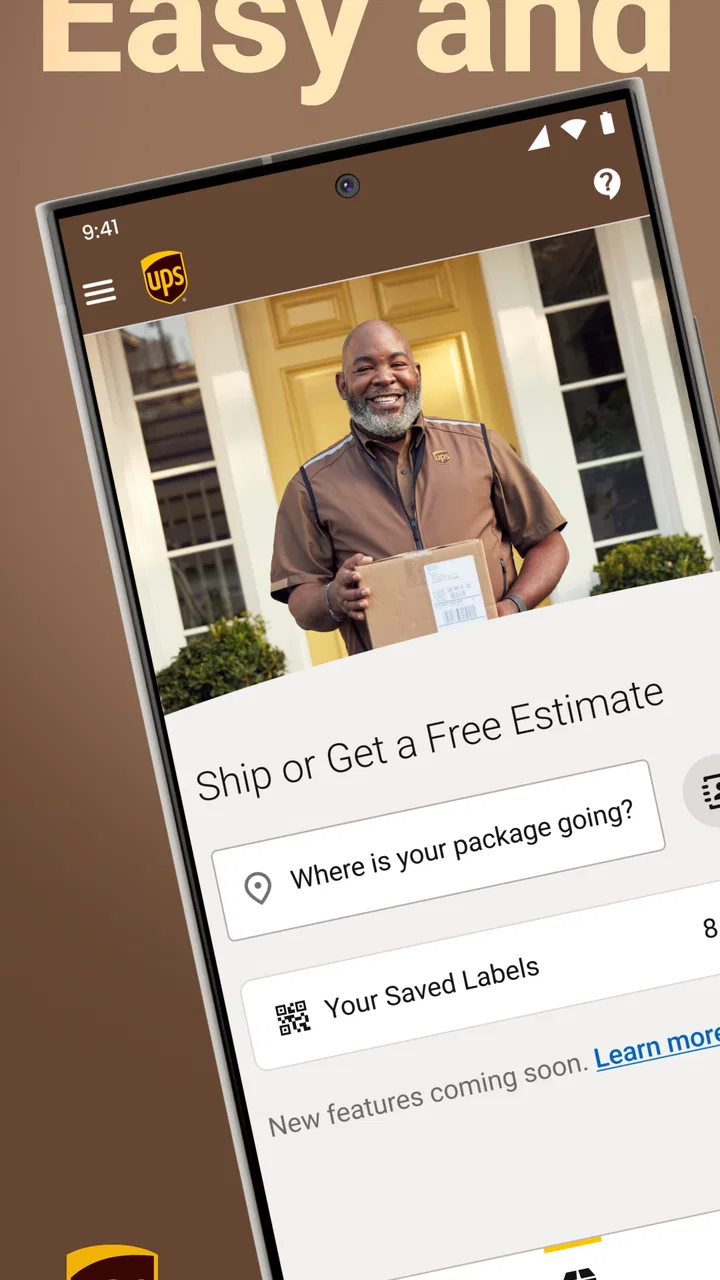
The UPS app brings those jobs under the same roof: tracking, finding a location, and getting a quote. That combination makes sense for household shipping as well as small-business work. A person returning online purchases can use it to follow a parcel and locate a drop-off point. A freelancer sending equipment can check a shipment while also preparing the next one. A small seller can use it as a quick reference without opening a full desktop shipping workflow for every package.
What I like most is that the app addresses the moments between major decisions. I may already know that I want to send a box, but I still need to decide where to go, what the likely cost is, and whether the package has progressed after handing it over. Those are not complicated tasks individually, yet they consume time when repeated. The real benefit is fewer small searches during a busy day.
Getting to the first useful screen
The app is free, which makes it easy to try without committing to a subscription or paying simply to access basic shipping information. UPS is listed as the developer, and the app has been available since April 2, 2010. That long presence shows in its practical focus: it feels designed around recurring shipping questions rather than around novelty.
For a first session, I would begin with the task that brought me there instead of exploring every option. If a package is already moving, tracking is the natural starting point. If I am preparing a shipment, I would use the quote function before visiting a location. If I need to hand over a parcel, I would search for a nearby location and check the details presented there before leaving home.
One useful habit is to keep the tracking number accessible before opening the app. That sounds obvious, but it prevents the most common delay: moving between messages, email, and the tracking screen while standing in a hurry. I also prefer checking a location before placing a return in the car. A nearby result is not automatically the most convenient one if it does not match the service I need, so reading the location information is worth the extra moment.
The current version is 10.24.1.21 and the minimum operating-system requirement is version 9. That makes the app approachable for people using older supported phones, although the experience will still depend on the condition and speed of the device. The important point for most users is that it is not restricted to the newest hardware.
A realistic day with a return and an incoming delivery
Imagine I have ordered a replacement part online and also need to return the wrong item. In the morning, I can check the incoming shipment rather than repeatedly opening the retailer’s order page. Later, I can use the location search to find a practical place for the return, then use the quote area when I need to understand the likely cost of sending another parcel to a customer.
That workflow is more useful than any single feature in isolation. Tracking answers “where is it?” Location search answers “where can I take it?” A quote helps answer “what will sending it involve?” I do not need to remember three separate websites or keep several browser tabs open. For occasional shippers, that reduction in mental clutter is probably the main reason to keep the app installed.
There is also a timing advantage. If a package is important enough to monitor, I can check its progress while already handling another shipping task. That is particularly helpful for people who receive work materials, replacement parts, documents, or time-sensitive personal items. I would not treat the app as a guarantee that a delivery will arrive at a particular moment, but I do find it more convenient than relying on memory or manually searching every time.
Where it saves the most friction
Tracking is the part most people will notice first. Instead of searching the carrier site from scratch, I can go directly to the shipment information. The value is not just seeing a status; it is having a consistent place to revisit when the parcel matters. For someone managing several deliveries, that central point can be easier than trying to remember which retailer sent which package.
Location search is more valuable than it initially sounds. A map result alone is not enough when I need to drop off a package, so I use it as a planning tool rather than simply asking for the closest pin. I would compare a couple of nearby choices, consider the route I am already taking, and read the available location information before making the trip. This is a small but important distinction: the app can help narrow the decision, while I still need to choose the location that fits my specific shipment.
The quote feature is useful before I have fully committed to sending something. It gives me a way to think about shipping as part of the purchase or return decision. For a small business, that can prevent an awkward conversation with a customer after the parcel is packed. For a household user, it can help decide whether sending a bulky item is sensible or whether another arrangement would be better.
I also appreciate that these functions belong together. A general map app may find a shipping location, but it does not understand the shipping context as well. A retailer’s order page may show a delivery update, but it is not where I would expect to compare a location or request a quote. The UPS app is narrower than a general productivity tool, yet that narrowness is exactly why it can feel faster for UPS-related errands.
Useful habits for occasional and frequent shippers
For occasional use, I would avoid treating the app as something that needs constant attention. Open it when there is a concrete question, keep the tracking information ready, and use the location search before leaving. This keeps the process simple and reduces the temptation to interpret every status change as a problem.
For frequent shipping, I would build a repeatable routine. Check the shipment before contacting a recipient, estimate the cost before finalizing a sale, and verify the handoff location before making a detour. Those three steps turn the app from a reactive tracker into a small planning aid. The less often I need to ask someone else for a tracking update or search for a location at the last minute, the more time the app earns back.
A less obvious trade-off is that convenience can encourage overchecking. Having tracking close at hand makes it easy to refresh when nothing meaningful has changed. I get better value when I use the information to make a decision—whether to wait, contact someone, or plan around the delivery—rather than checking simply because the app is available.
Another practical tip is to separate an estimate from a final shipping decision. A quote is helpful for planning, but I would still confirm the package details carefully before relying on it. Weight, dimensions, destination, and service choices can affect the result. The app can support the calculation, but it cannot make an inaccurately measured box become accurate.
How it compares with the usual alternatives
Compared with a mobile browser, the UPS app feels better suited to repeated use. A browser is perfectly adequate for a one-time lookup, especially if I do not want another app installed. The app becomes more compelling when I track shipments often or need location and quote tools in the same place. Its advantage is continuity, not a radically different shipping method.
Compared with a retailer’s own order page, it is more useful when the shipment has moved beyond the shopping experience. Retailer pages can be convenient for purchase history and return instructions, but the carrier’s app is the more natural place to follow the delivery itself or search for a UPS location. I would still use the retailer’s instructions when a return has special requirements, because carrier tracking does not replace the seller’s return process.
Compared with a general map application, UPS is more focused. A map may offer broader discovery and route planning, while this app is better when the question is specifically connected to UPS shipping. If I am choosing between several unrelated errands, I may prefer a map app for the whole journey. If I need a UPS location as part of a parcel task, I would start here.
Compared with a full desktop shipping platform, the mobile app is less appropriate for complex business administration. A small company handling many orders may need deeper tools for batch work, records, and detailed operational control. I see this app as a fast companion for checking, estimating, and locating—not as a replacement for every shipping system a larger operation might use.
Where the experience can slow down
The app’s focused nature is also its limitation. It is excellent when the task is clearly UPS-related, but it does not solve every part of a delivery problem. It will not replace the retailer’s return policy, a company’s internal order system, or a broader logistics dashboard. Users who rarely ship with UPS may find a browser search sufficient and may not gain much from installing a dedicated tool.
There is also a difference between convenience and certainty. Tracking can show progress, but a status update still needs context. A delayed scan, a change in timing, or an unexpected delivery event may require patience or direct support. I would use the app to understand what is happening before taking action, not as a promise that every shipment will follow the schedule I hoped for.
Location information should be treated in the same practical way. The app can help me find a suitable place, but I still need to pay attention to the service I am requesting and the details shown for that location. Choosing the closest result without checking can create an unnecessary second trip, which defeats the time-saving purpose of the tool.
The interface is functional rather than especially warm or entertaining. That is not a serious flaw for a business utility, but people looking for a highly guided experience may need a short adjustment period. I found the app easier to appreciate once I stopped browsing and started using it for a specific errand.
Who should install it
I would recommend the app to anyone who receives or sends UPS packages more than occasionally. It is especially practical for online sellers, independent workers, families managing returns, and people who want a quick way to check a delivery without opening a desktop site. The combination of shipment tracking, location search, and quotes gives it a useful role in both personal and work routines.
I would be more selective for someone who ships only once a year or uses several carriers equally. In that case, a browser or a multi-carrier tracking tool may be more convenient because it keeps everything in one broader system. The UPS app makes the most sense when UPS is already part of the person’s regular shipping pattern.
Its Everyone content rating also makes it suitable as a general household utility rather than an app aimed at a narrow professional audience. The free price removes the main barrier to trying it, while the strong adoption—more than ten million installs and around 43 thousand written reviews—shows that it serves a broad audience. I would not choose it based on popularity alone, but those figures align with my impression that it is a mature, familiar tool rather than an experimental download.
My verdict after using it as a practical tool
UPS is at its best when a small shipping question needs an immediate, practical answer. It saves time by putting tracking, location finding, and quote checking close together. None of those functions is mysterious, but their combination removes the repeated friction that makes shipping feel more complicated than it should.
I would keep it installed if I regularly send returns, monitor deliveries, or prepare parcels for customers. I would also recommend using it with a simple routine: gather the tracking details first, check the shipment or quote, verify the location information, and treat updates as guidance rather than absolute promises. That approach gets the useful information without turning the app into something I constantly refresh.
My final opinion is positive but specific. This is not a complete replacement for retailer support, a full business shipping suite, or a multi-carrier organizer. It is a focused mobile utility from UPS that earns its place by reducing the number of steps between a shipping question and a sensible next action. If that is the recurring problem in your day, the app is worth trying; if your shipping needs are rare or spread across many carriers, a broader alternative may suit you better.
FAQs for UPS
01What features does the UPS app offer for managing shipments?
The UPS app provides a comprehensive suite of features to manage your shipments efficiently. Users can track packages in real-time, manage delivery options, and receive notifications about delivery status. Additionally, the app allows for easy scheduling of pickups and provides a detailed shipment history. It also offers a rate calculator for estimating shipping costs.
02Is the UPS app available for both Android and iOS devices?
Yes, the UPS app is available for download on both Android and iOS platforms. Users can find it in the Google Play Store and the Apple App Store. The app is regularly updated to ensure compatibility with the latest operating systems and to enhance user experience with new features and improvements.
03How secure is my personal and shipment information on the UPS app?
UPS takes security seriously. The app uses advanced encryption protocols to protect your personal and shipment information. Users are encouraged to create strong passwords and enable two-factor authentication for added security. UPS also provides regular updates to address any potential security vulnerabilities.
04Can I use the UPS app without a UPS account?
While some features are accessible without an account, creating a UPS account unlocks the full potential of the app. With an account, you can save preferences, access your shipment history, and manage multiple shipments more effectively. Signing up is free and can be done directly through the app.
05Are there any fees associated with using the UPS app?
The UPS app itself is free to download and use. However, standard shipping fees apply based on the services you choose. These fees vary depending on factors such as package weight, destination, and delivery speed. The app provides a rate calculator to help estimate these costs before proceeding with a shipment.
Pros
- Real-time tracking available.
- User-friendly interface design.
- Push notifications for updates.
- Supports multiple languages.
- Secure login with fingerprint.
Cons
- Requires stable internet connection.
- Limited features in free version.
- Occasional app crashes reported.
- High battery consumption.
- Some features are region-specific.

UPS
Gallery